On Wednesday, October 14, 2026, Brazil's Federal Senate approved PEC 221/2019, a proposed constitutional amendment that ends the "6x1" work schedule: six working days for one day off. The vote was 75 to 1, in both rounds. The maximum working week drops from 44 to 40 hours, with a gradual transition, and workers get two paid rest days per week, with no pay cut. The amendment still has to be promulgated by Congress, and the transition rules have yet to be detailed. For IT, the math is simple: the same ticket queue, with fewer hours per person. This post shows where the service desk loses time today and what you can automate in GLPI before the new working week arrives. The rule is Brazilian, but the exercise applies to any team that has to handle the same demand with fewer hours.
This content is not legal advice. For how the new working week applies to your company, check with your HR and legal teams, based on the promulgated text.
What changes for the service desk
Many IT teams in Brazil work on a 6x1 schedule, or support people who do: on-site support in stores, hospitals, factories, distribution centers and weekend on-call shifts. Under the new rule:
- Each technician has fewer hours per week. Going from 44 to 40 hours is about 9% less per person.
- Demand does not drop with it. Users keep opening the same number of tickets.
- Schedules and on-call rotations need to be redesigned, with two days off per week for each technician.
Without a process change, the result shows up fast: a longer queue, breached SLAs and overtime.
First step: make GLPI reflect the new reality
Before automating, check three points so the SLA measures the right thing:
- Calendars and service hours. GLPI's SLA only counts time within the calendar. If your service hours change, update the calendars, or the deadlines will be wrong. See the SLA and OLA guide for GLPI.
- Holidays. A calendar without holidays makes deadlines expire on days nobody works. Holiday Sync generates Brazil's holidays, including state holidays, and links them to all calendars at once. It is free.
- Where the time goes today. Measure before you cut. Contract Hours records the time spent per ticket and per contract, and the average ticket age indicator shows where the queue gets stuck.
Where automation gives hours back
A large part of a technician's day goes to tasks that need no human decision: reading the ticket, classifying it, choosing who handles it, drafting the first reply, chasing an approval. That is where NexTool modules come in:
| Manual task | Module | What changes |
|---|---|---|
| Reading the history, summarizing and writing the reply | AI Assist | AI summarizes the ticket, suggests the reply, triages it and cites the right knowledge base article |
| Answering the same questions over and over | AI Assist | Suggests knowledge base articles before the user opens a ticket and turns solved tickets into articles |
| Choosing who handles the ticket | Smart Assign | Assigns automatically by category and group, balancing the team's workload |
| Classifying the category | Ticket Rules | Categorizes and routes the ticket by rule, with no manual triage |
| Opening the tickets for each step | Ticket Flow | Opens the next tickets from templates when a ticket is solved |
| Chasing approvals by email or chat | Approval Flow and Mail Interactions | Multi-level approvals, and the approver replies straight from the email, without logging in |
| Running multi-step processes | Workflow and SubTask Flow | Tasks, approvals and subtasks chained inside the ticket itself |
| Filtering out duplicate tickets from email | Mail Analyzer | Avoids opening a new ticket for replies and forwards |
| Explaining why the SLA was breached while waiting | Essentials | Pauses the SLA while the ticket waits for approval |
Why start with AI Assist
AI Assist tackles the most repetitive part of support: understanding the ticket and writing the reply. In practice, it:
- Summarizes long tickets in seconds, for whoever takes over a ticket midway, which becomes more common with more days off and shift handovers.
- Suggests the reply based on the history and the knowledge base. The technician reviews and sends it.
- Triages category and priority. In our triage tests with 200 tickets, cheaper models got the category right as often as the more expensive ones.
- Feeds the knowledge base: it suggests articles before the user opens a ticket and turns solved tickets into draft articles. Every ticket avoided is time given back to the team.
And the cost is low: we measured from US$1.29 to US$35.60 per month for 3,000 tickets, depending on the AI model. See the math in how much AI costs per ticket.
Assignment matters too
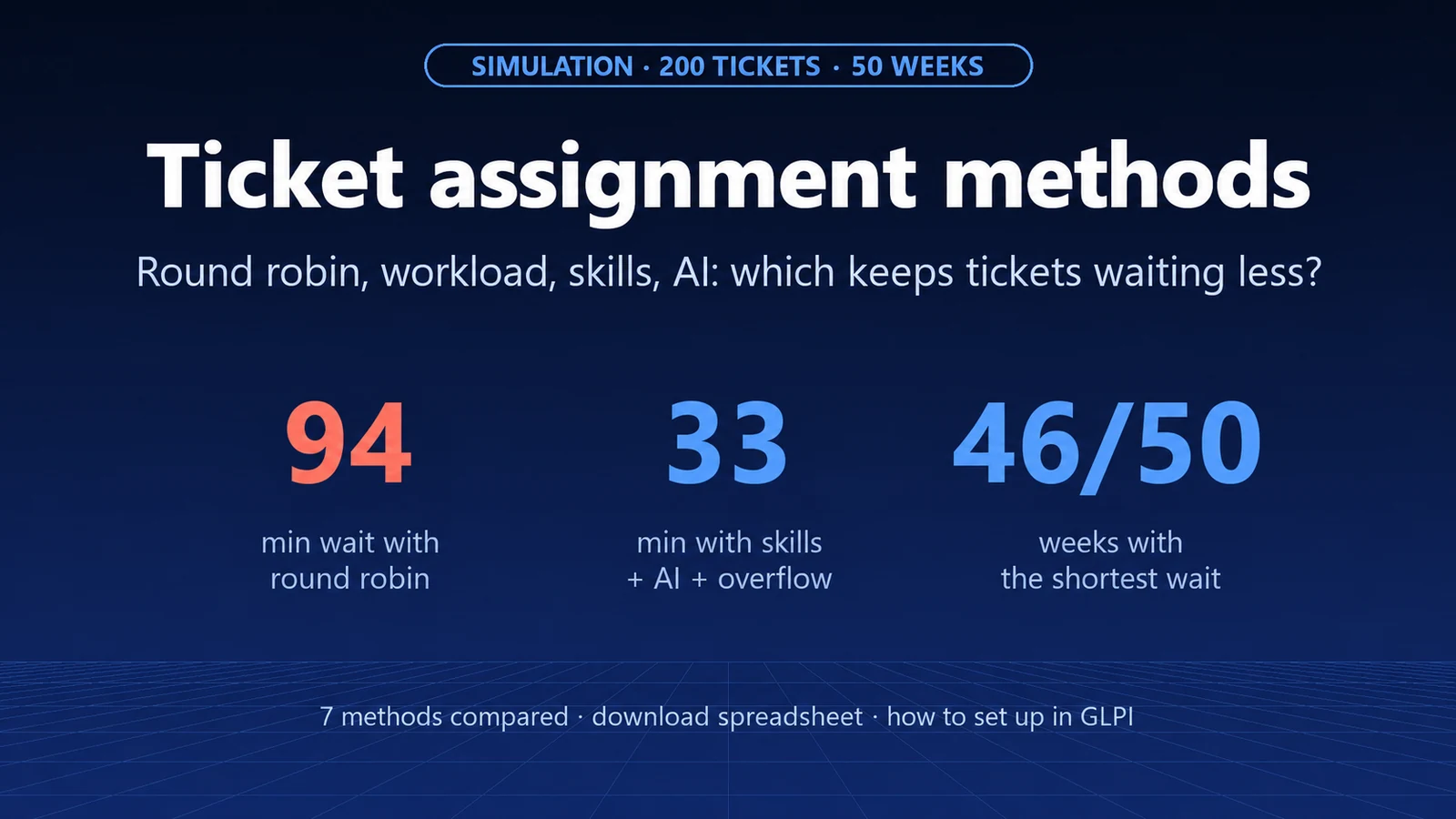
How you distribute tickets counts for more than you might think. In our 50-week simulation, round robin used almost 50% more hours than skill-based assignment with AI triage. With fewer hours per technician, that waste no longer fits in the week.
A plan for the coming weeks
- Today: measure ticket volume, average time per ticket and how much of the week goes to triage and first replies.
- Before the new working week: update calendars and holidays in GLPI and redesign schedules and on-call rotations with HR.
- In parallel: turn on AI Assist triage and suggested replies in a pilot queue and compare handling time before and after.
- Then: roll it out to the other queues and automate assignment, approvals and recurring tickets.
Want help running these numbers on your GLPI and building the plan? Talk to us.
Source: Agência Senado (Brazilian Federal Senate news agency), October 14, 2026 (PEC 221/2019). The transition rules depend on the promulgated text. GLPI is a registered trademark of Teclib'. NexTool is not affiliated with Teclib'.