


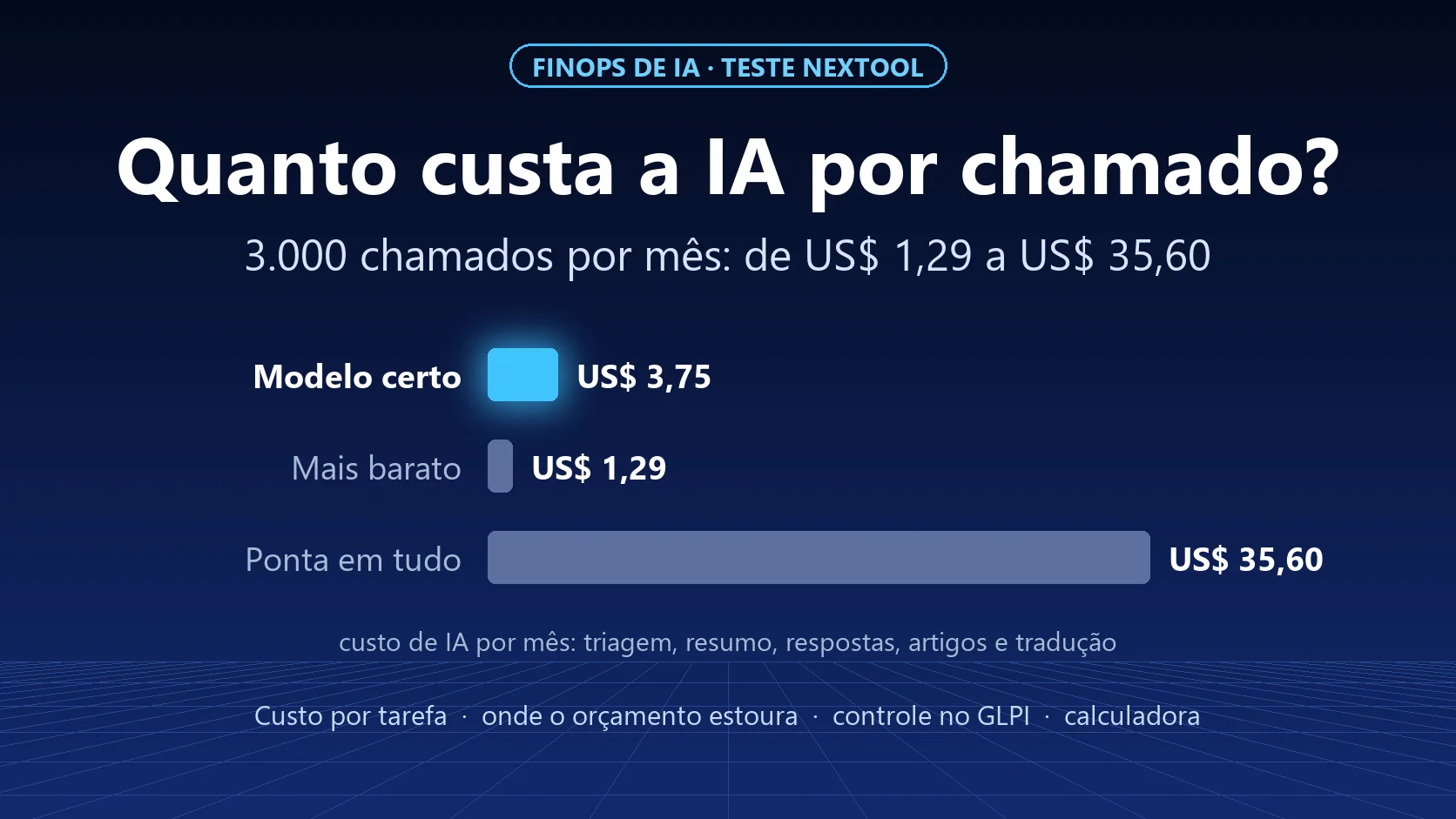
Putting AI on 3,000 tickets a month cost between US$ 1.29 and US$ 35.60 in our test. The nearly 28x difference did not come from quality: it came only from which model did each task. And yet 98% of FinOps teams already manage AI spend, and most cannot forecast it. The problem is rarely the token price. It is not knowing what each ticket costs.
This article follows Ticket triage without an LLM: we tested Jev and measured the cost per thousand tickets, where we compared three models on the triage of 200 tickets.
FinOps: from cloud to AI
FinOps is the practice of giving visibility and ownership to technology spend: who spends, how much, on what, and whether it is worth it. It was born for the cloud bill and has now reached AI. The State of FinOps 2026 report from the FinOps Foundation surveyed 1,192 practitioners: 98% already manage AI spend, up from 31% two years earlier. Analyses of the same report point out that most companies exceeded their AI cost forecast in the last year.
The cause is almost always the same: AI is billed by usage (tokens) but planned as if it were a subscription. Nobody can say what it costs to summarize a ticket, so nobody can say what the month will cost.
The math nobody does: what each task costs
We measured it. We took 10 fictitious tickets with a full history (opening, follow-ups and solution, 4 to 8 messages each) and asked three models for four tasks, through OpenRouter, at list prices on October 1, 2026:
| Task (cost per 1,000 uses) | GPT-5.6 Luna | Gemini 3.5 Flash-Lite | Claude Sonnet 5.5 |
|---|---|---|---|
| Summarize the history | US$ 0.15 | US$ 0.29 | US$ 3.22 |
| Suggest the next reply | US$ 0.11 | US$ 0.20 | US$ 2.95 |
| Write a knowledge base article | US$ 0.34 | US$ 0.65 | US$ 8.54 |
| Translate the last message | US$ 0.10 | US$ 0.11 | US$ 1.30 |
And, from the previous test, triage (category, type and urgency): US$ 0.034 per thousand tickets with Jev, US$ 0.12 with GPT-5.6 Luna and US$ 1.83 with Claude Sonnet 5.5.
Two details the table hides:
- The frontier model writes more. On the article, Claude Sonnet 5.5 produced an average of 789 output tokens, against 255 for GPT-5.6 Luna. Output is the expensive part of a token; longer text costs more, even when it is better.
- You pay even for the answer that never comes. On a ransomware ticket, Sonnet used the 300 tokens we allowed to reason and returned an empty answer. The call was billed anyway.
Three scenarios for 3,000 tickets a month
We set up a typical service desk: each ticket is triaged, has its history summarized once and gets two reply suggestions; 10% become a knowledge base article and 5% need translation.

| Scenario | Cost per ticket | Per month (3,000 tickets) | Per year |
|---|---|---|---|
| Frontier model for everything (Claude Sonnet 5.5) | US$ 0.0119 | US$ 35.60 | US$ 427 |
| Right model for each task (Jev for triage, GPT-5.6 Luna day to day, Sonnet only for articles) | US$ 0.0013 | US$ 3.75 | US$ 45 |
| Cheapest model for everything (Jev + GPT-5.6 Luna) | US$ 0.0004 | US$ 1.29 | US$ 16 |
The middle scenario is the one we recommend: the frontier model stays only where writing quality matters (the article that goes into the knowledge base), and the rest goes to fast, cheap models. Cost drops 9.5 times.
Note the order of magnitude: even the most expensive scenario costs cents per ticket. If AI saves an analyst one minute per ticket, it more than pays for itself.
Where AI budgets really blow up
If the cost per ticket is this low, why do so many companies blow their budget? Because the leak is rarely in the ticket:
- Per-user licenses nobody uses. AI assistants sold per seat charge every month, used or not. It is the same idle-license problem FinOps already knows from the cloud.
- Frontier model for everything. In our test, that multiplied the cost by 9.5 with no gain in triage.
- Too much context. Sending the entire history, attachments and e-mail signatures to the AI on every click makes cost grow with the size of the ticket, not with the value of the task.
- Unbounded reasoning. Models that "think" before answering bill that thinking. Without a token limit, a simple task can cost as much as a complex one, or deliver nothing.
- Agents in a loop. An agent that tries, fails and tries again can make hundreds of calls without anyone noticing.
- Subsidized usage that will end. AI subscriptions today deliver far more than they cost. At NexTool, in 30 days of development, we used about 3.9 billion tokens: roughly R$ 15,000 at list price, covered by a subscription of about US$ 200. Anyone planning the future on subsidized prices is in for a surprise when they change.
How to measure without overcomplicating
Four numbers are enough to start:
- AI cost per resolved ticket, broken down by task (triage, summary, reply, article).
- Tokens per task, to find the task that sends too much context.
- Share of tickets with AI help, to know whether spend follows usage.
- Analyst time saved, even if estimated, to compare against cost.
And three simple guardrails:
- A spend limit per API key. In our test we used a key capped at US$ 10; if something goes wrong, the damage is limited.
- A token limit per task, with enough room for the model to answer (the ransomware case shows what happens when it runs short).
- A model per task, configured and reviewed, instead of "the best model for everything".
Controlling AI spend inside GLPI
GLPI already has what it takes to treat AI like any other IT cost, with no new tool:
- Contracts: register the contract with each AI provider, with amount, period, renewal and expiration alert.
- Licenses: record AI assistant seats as licenses, with quantity and who they are assigned to. A license with no user shows up immediately.
- Budgets: create an AI budget per entity or department and link the contracts to it.
- Suppliers: keep providers, resellers and contacts in one place.
- Notifications: GLPI warns about contracts and licenses close to expiring, before auto-renewal.
That way, fixed cost (subscriptions and seats) lives in GLPI, and variable cost (tokens) you follow in the dashboard of the provider or platform you use. Together, they give you the cost per ticket.
Download the calculator
We built a spreadsheet with the prices we measured. You enter how many tickets you have per month, how often each task happens and which model does each one, and it calculates the cost per ticket, per month and per year:
Download the AI cost per ticket calculator (Excel)
Conclusion
AI cost per ticket is small; what does not fit in the budget is not measuring it. Break cost down by task, use the right model for each one, set spend limits and treat AI subscriptions as contracts and licenses inside GLPI. With these four steps, AI stops being an unpredictable line on the bill and becomes a cost per ticket you can explain to any executive.
Want help bringing AI into your GLPI without losing control of the cost? Talk to the team.
Test run by the NexTool Solutions team on October 1, 2026, with fictitious tickets and OpenRouter list prices on that date. Models: openai/gpt-5.6-luna, google/gemini-3.5-flash-lite, anthropic/claude-sonnet-5.5 and typesafe/jev-1.13. State of FinOps 2026 data published by the FinOps Foundation.



