


We tested ticket templates on a GLPI 11 instance with users from Acme, a fictitious company. The template for the Printer category required a location, locked the urgency at High, hid the impact and came with the field support group already filled in. On the technician's ticket form, it held: GLPI refused the ticket without a location and kept the urgency even when we changed it in the browser. Outside that form, the mandatory field held nothing. Through the API and through the service catalog form, which is how Self-Service users open tickets in GLPI 11, the ticket went in without a location. And the hidden impact came out wrong precisely on the technician's form. Below: how GLPI picks the template, what each tab does and where each rule applies.
The four template tabs
Templates live in Assistance > Tickets, Templates button. Each template has four rule tabs:
| Tab | What it does |
|---|---|
| Mandatory fields | The ticket is not saved with the field empty |
| Predefined fields | The field comes already filled in: a script in the description, the group, the urgency |
| Hidden fields | The field disappears from the form |
| Read only fields | The field is shown, but cannot be changed |
The Preview tab shows the form as it will look. On a fresh GLPI 11 install, the "Default" template comes with a single rule: Description is mandatory. The title is not mandatory. If it is left empty, GLPI uses the beginning of the description.
Which template GLPI uses
GLPI looks in this order and stops at the first one it finds:
- Category, according to the ticket type: the Template for an incident and Template for a request fields in the ITIL category.
- Profile of the person opening the ticket: the Default ticket template field, Assistance tab of the profile.
- Entity: Assistance tab, Templates configuration block.
- The Default template.
In the test, the Acme entity had a template that required a category, the Technician profile had another one, and the Printer category had one for incidents only:
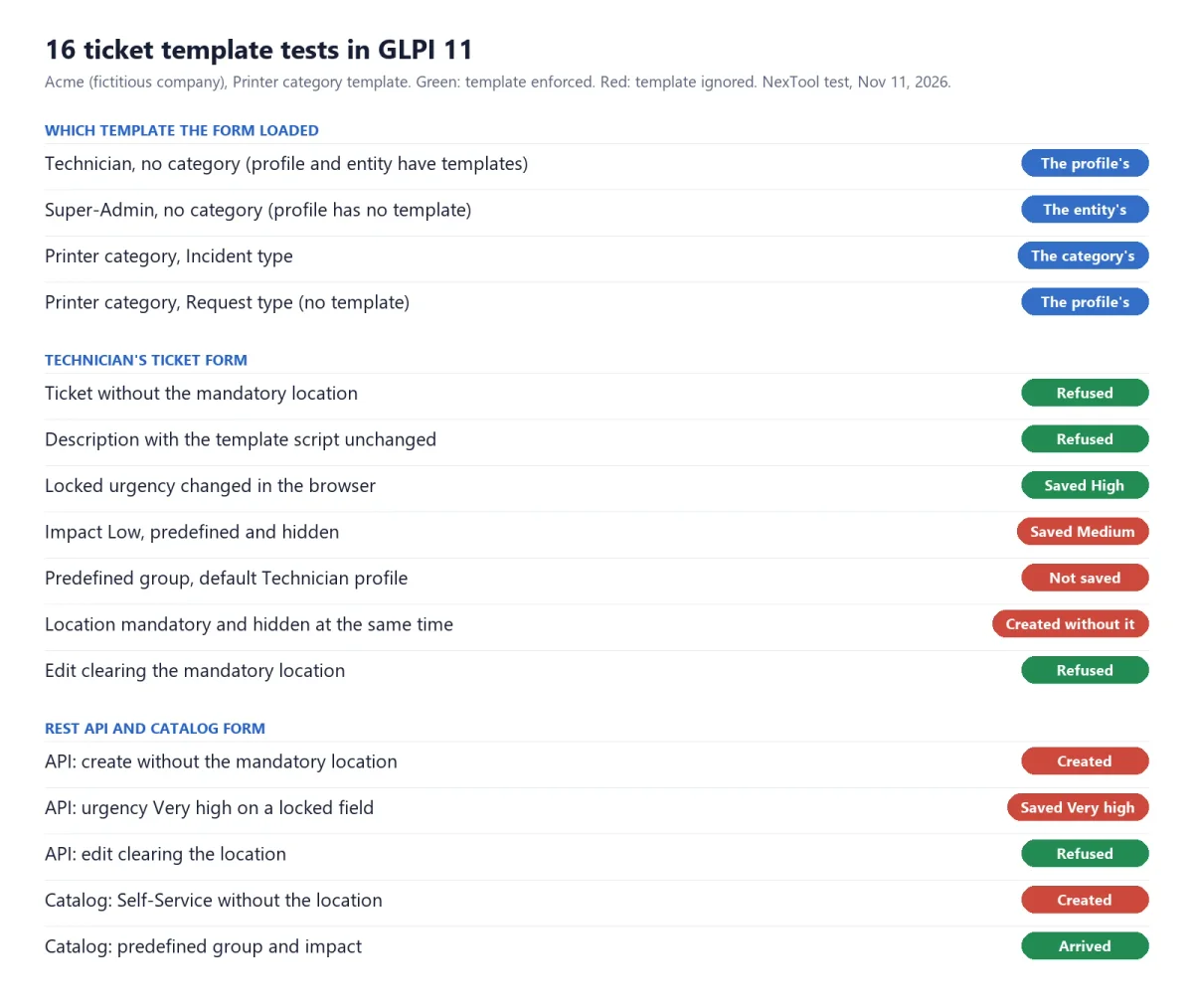
| Who opened it and how | Template the form loaded |
|---|---|
| Technician (Technician profile), no category | The profile's. It wins over the entity's template |
| Super-Admin (profile without a template), no category | The entity's |
| Technician, Printer category, Incident type | The category's |
| Technician, Printer category, Request type | The profile's, because the category had no template for requests |
The last row catches a lot of people: the category has a template, but a ticket opened as a request does not use it. If the category accepts both types, fill in both fields. When the technician picks the category on the form, GLPI reloads the form with that category's template. And when it refuses the ticket for a missing field, it returns the form with the title and description the technician had typed.
Mandatory field: where it applies and where it does not
This was the main finding. We left the location empty on every path a ticket can come in through:
| Where the ticket came in | Result |
|---|---|
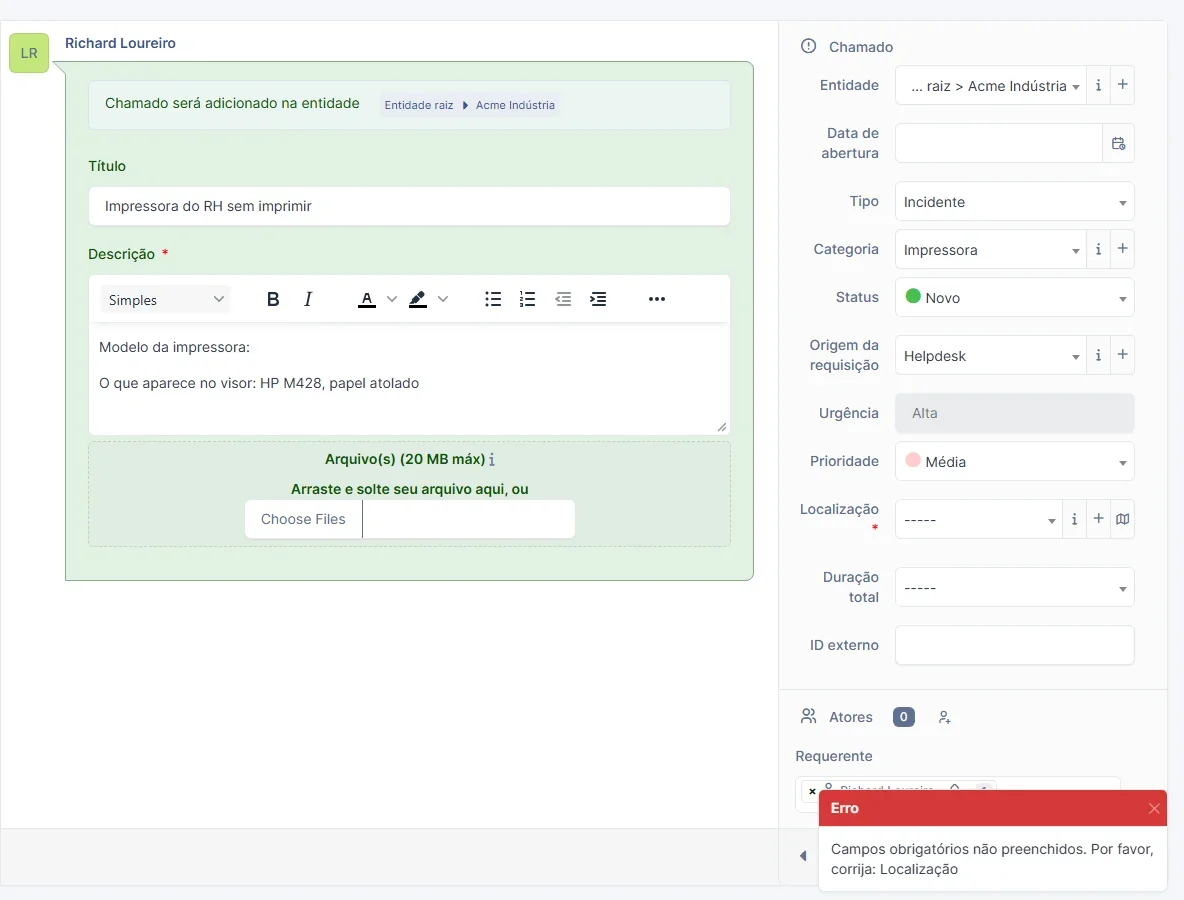
| Technician's ticket form, creation | Refused: "Mandatory fields are not filled. Please correct: Location" |
| Ticket form, edit clearing the location | Refused |
| REST API, creation without the field | Created without a location |
| REST API, edit clearing the location | Refused |
| "Report an issue" catalog form, as Self-Service | Created without a location |
| Catalog form without a category, with the entity requiring a category | Created without a category |
The mandatory check on creation only runs when the request comes from the ticket form, and it only checks the fields included in the submission. Through the API, a field that is not in the request goes through, even when the template is specified. On edit, the check applies to any source: trying to clear the location through the API was refused. The catalog form creates the ticket inside GLPI, and the template's mandatory fields are not taken into account. According to the GLPI code, a ticket opened by the mail collector also skips this check. We did not test that path.
For end users, GLPI 11 has one more detail: Self-Service users do not even see the ticket form. When the Acme user opened the ticket form URL, GLPI redirected them to the Service catalog. For them, what enforces the field is the form question, marked as Mandatory. In the default "Report an issue" form, the location question is optional. See how to build the forms in service catalog in GLPI 11.
A good use of the mandatory field is a script in the description. Predefine the description with the questions ("Printer model:", "What the display shows:") and mark Description as mandatory. GLPI refused the ticket with the script untouched: "You cannot use predefined description verbatim".
Predefined and hidden: the value does not always arrive
The same template, opened through different paths, saved different values:
| Template field | Form, Technician profile | Form, Super-Admin | Catalog form | REST API |
|---|---|---|---|---|
| "Field Support" group (predefined) | Not saved | Saved | Saved | Not saved |
| Impact Low (predefined and hidden) | Saved Medium | Saved Medium | Saved Low | Saved Medium |
| Urgency High (predefined and read only) | Saved High | Saved High | Saved High | Saved Very high, the value the API sent |
Three things explain the table:
- A hidden field is not sent from the form. GLPI removes the field from the form, and the predefined value goes with it. The ticket ended up with the default impact, Medium.
- The Technician profile that ships with the install does not have the Assign right on tickets. For that technician, the assignment block does not even show up, and the predefined group disappears without warning. With Super-Admin, the same template saved the group.
- The catalog form applies the predefined values on the server. Group, impact and urgency arrived correctly, including the hidden field.
Whatever must always apply, wherever the ticket comes from, belongs in a ticket business rule (Administration > Rules > Business rules for tickets), which runs for the form, the API, the catalog form and email. Leave the template to help whoever fills in the ticket.
Read only: protects the form, not the API
On the form, the locked urgency shows up greyed out. We changed its value to Very high in the browser, directly in the page code, and GLPI saved High: it reapplies the template value when it receives the ticket. Through the API, the same template accepted Very high. If an integration opens tickets, it has to send the right values. Examples with the new API are in the new GLPI 11 API in practice.
Mandatory and hidden at the same time
GLPI accepts the same field in both the mandatory and the hidden tabs. We tested with the location in the "Access and password" category: the field disappeared from the form, the ticket was created without a location and nobody was warned. Before releasing a template, open the Preview and check that every mandatory field is shown.
Checklist
| Step | Where |
|---|---|
| Set the incident template and the request template in each category | ITIL category |
| Give a profile a template only if it should win over the entity's template | Profile > Assistance |
| Check the Preview: no hidden mandatory field | Template > Preview |
| Mark as mandatory the questions Self-Service users must answer | Catalog form > question |
| Move group, impact and priority that must always apply to a business rule | Administration > Rules |
| Validate the fields in the integration that uses the API | Integration script or flow |
| Test with a user from each profile, including the default Technician | Ticket form and catalog |
Recurrent tickets also copy the title, description and fields from the template. It is worth reviewing the templates they use.
What about GLPI 12?
We read the GLPI 12.0.0 code at the points we tested: the mandatory check, the hidden field left out of the submission, the urgency reapplied on the form and the catalog form's predefined values remain the same. If you are going to migrate, the tested step-by-step guide is in upgrading from GLPI 11 to 12.
Test run by NexTool on November 11, 2026, on a GLPI 11.0.11 lab instance with fictitious Acme data: 4 ticket templates, 3 categories, users with the Self-Service, Technician and Super-Admin profiles, 16 tests through the ticket form in a real browser, through the catalog form and through the REST API. The environment was deleted at the end. GLPI is a registered trademark of Teclib'. NexTool is not affiliated with Teclib'.

Comments
Comments on this post come from GitHub (giscus). When you load them, your browser connects to GitHub, which receives your IP address and may set its own cookies.
To load them automatically, enable functional cookies