


On November 16, 2026 the maintainers of the Generic Object plugin published two flaws that work without login. The first one is critical (CVSS score 9.2 out of 10): an attacker with no username or password can reach code execution on the GLPI server. The second one is high (8.3): SQL injection, also without login. The affected version is 2.14.15, the plugin line that runs on GLPI 10. The fix is 2.14.16, released on September 28. If you have not updated the plugin since September, you are exposed, and the attack path is now public. Below: who needs to act, how to check the version in one minute, what to do today and what this says about staying on GLPI 10.
Summary for those with five minutes
| Question | Short answer |
|---|---|
| What was published? | Two Generic Object security advisories, on Nov 16, 2026 |
| How severe? | One critical (CVSS 9.2) and one high (CVSS 8.3) |
| Is login required? | No. Both work without a username and password |
| Which version is affected? | 2.14.15, which runs on GLPI 10 |
| Which version fixes it? | 2.14.16, released on Sep 28, 2026 |
| What about GLPI 11 and 12? | The plugin there is a different one (3.x) and only migrates the objects to the native Custom assets |
| Is there a CVE yet? | Not yet. The CVSS score is already in the advisories |
| Any reports of attacks? | As of Nov 16, 2026, there were no public reports of exploitation |
What the two flaws are
Generic Object is the plugin that creates new object types in the GLPI 10 inventory: turnstiles, cameras, vehicles, radios, whatever your fleet has and GLPI does not ship out of the box. To do that, it generates PHP files on the server from the configuration of each type. That is where the problem lies.
| Advisory | Severity | What happens |
|---|---|---|
| GHSA-5wjf-f35v-r98r | Critical, CVSS 9.2 | The plugin did not check permissions before processing changes to the object type configuration. Someone without login can change these types and influence the files the plugin generates. The result can be code execution on the web server, with GLPI's privileges |
| GHSA-q5rg-ghpp-92cp | High, CVSS 8.3 | A parameter carrying the item type was not validated before reaching the database. Someone without login can inject SQL and read data from the database bit by bit |
Code execution on the server is the worst case for a web application. Whoever achieves it can read config_db.php, the key that protects the passwords stored in GLPI, ticket attachments and everything the web server user can reach. Both scores indicate that the attack depends on some condition in the environment, which the advisories do not detail. Do not count on it to protect you.
Who is exposed
| Your situation | What to do |
|---|---|
| GLPI 10 with Generic Object 2.14.15 | Update to 2.14.16 today |
| GLPI 10 with Generic Object 2.14.14 or earlier | Update to 2.14.16 today. Today's advisories only mention 2.14.15, but these versions still have the June code execution flaw |
| GLPI 10 with Generic Object 2.14.16 | Nothing to do on the plugin. Plan your way off GLPI 10 (see below) |
| GLPI 10 with the plugin installed but unused | Disable and uninstall |
| GLPI 11 or 12 | The 2.14 line does not install on these GLPI versions. If the object migration is already done, uninstall the plugin |
A disabled plugin does not run. A plugin that is installed and forgotten is exactly the kind of thing nobody updates.
How to check the version in one minute
In the UI: Setup > Plugins. Find the Generic Object row and look at the version column. While you are there, write down the version of the other active plugins.
On the server, if you prefer the terminal (the plugin can be in plugins or in marketplace; adjust the path to your installation):
grep -h "PLUGIN_GENERICOBJECT_VERSION'" /var/www/glpi/plugins/genericobject/setup.php /var/www/glpi/marketplace/genericobject/setup.php 2>/dev/null
What to do today
- Check the version of the plugin, as above.
- Back up the database and the
filesandconfigfolders before making changes. - Update to 2.14.16. Through the Marketplace, if your GLPI has internet access, or with the
glpi-genericobject-2.14.16.tar.bz2package from the release page on GitHub: replace the plugin folder, go back to Setup > Plugins and complete the update. - If the plugin is unused, click Disable and then Uninstall on the same screen. Before uninstalling, confirm that nobody depends on the objects it created: uninstalling deletes the plugin data.
- Until you update, take GLPI off the internet. Allow access only through the VPN or an allowlist of addresses. An unauthenticated flaw is a flaw for anyone who can reach the login page.
- Check afterwards: the new version in Setup > Plugins, opening one object of each type created by the plugin, and normal user login.
If your GLPI was exposed to the internet with an affected version, it is worth checking for PHP files where they should not be. The check commands, which change nothing, are in our post about PHP2Shell, under "Step 4: check whether someone has already got in". There we explain why the files in files/_plugins/genericobject show up in the results: they are the ones generated by the plugin, and their dates must match changes you made.
Two code execution flaws in five months
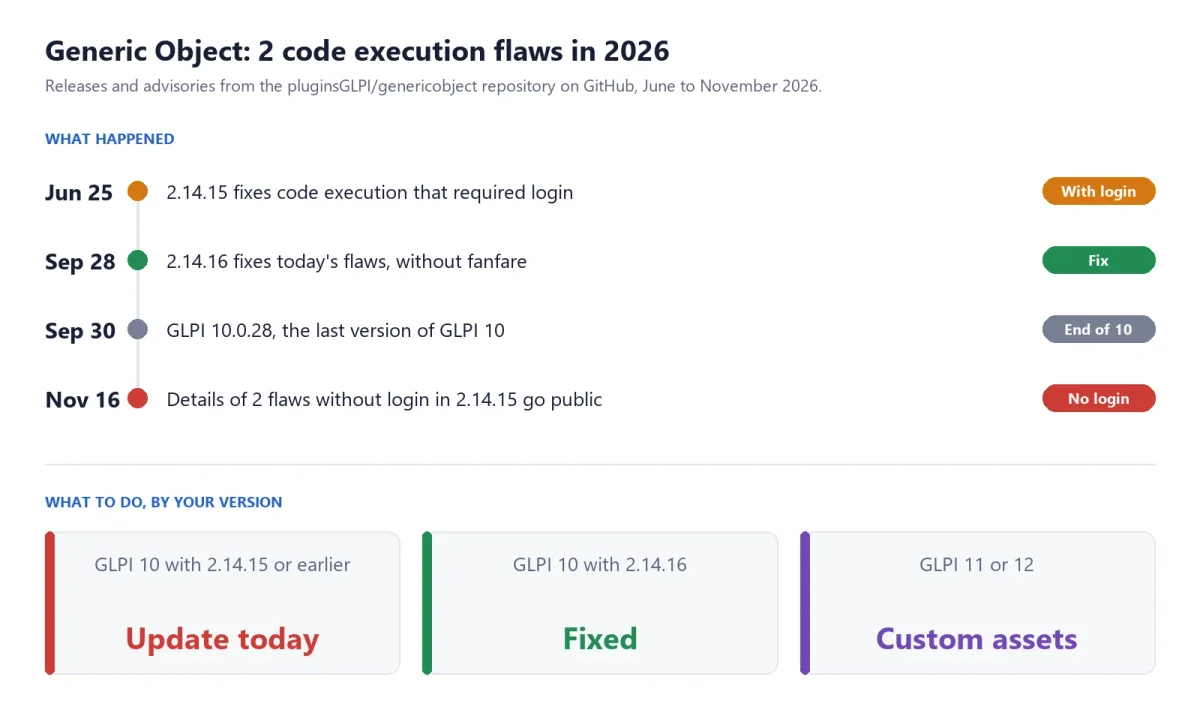
| Date | What happened |
|---|---|
| Jun 25, 2026 | 2.14.15 is released, fixing a code execution flaw that required login with permission to edit object types. The GLPI project announced the plugin security fix bundle on Jun 29 |
| Sep 28, 2026 | 2.14.16 is released, with the fix for today's two flaws, without fanfare |
| Sep 30, 2026 | GLPI 10.0.28 is released, the last version of GLPI 10 |
| Nov 16, 2026 | The advisories for the two unauthenticated flaws become public |
The fix was available for 49 days before the details came out. It is the same pattern as GLPI's own recent rounds: the fix comes first, the attack path later. If you update plugins together with GLPI, in a fixed window, you were already protected today.
What this says about staying on GLPI 10
GLPI 10 received its last version on September 30, 2026 and will get no more fixes. 2.14.16 came out two days before that. The security policy published in the plugin repository says fixes go to versions that run on a GLPI still maintained from a security standpoint. GLPI 10 no longer is. There is no guarantee that the next flaw in the 2.14 line will get a fix.
Today there is a fix. Update and use the time it buys you to plan the migration. The risks of staying on 10 and a week-by-week roadmap are in still on GLPI 10? The risks of staying and the roadmap to migrate. The technical step-by-step for the version change is in how to migrate from GLPI 10 to 11.
The way out through GLPI 11 and 12: Custom assets
In GLPI 11 and 12, what Generic Object did became a native feature: Custom assets, created in Setup > Asset definitions. No plugin generating PHP files and no separate version line to keep track of.
The official roadmap to move the objects:
- Migrate GLPI 10 to 11.
- Install version 3.x of Generic Object. It is the plugin's end-of-life version: it exists only for the migration and gets no more fixes.
- Run
php bin/console migration:genericobject_plugin_to_core. GLPI 11 itself warns on the home page when it finds plugin objects to migrate. - If you use the Fields (Additional fields) plugin on the objects, update it first to the GLPI 11 version (1.22.0 or newer): it moves the fields to Custom assets.
- Check the assets in Setup > Asset definitions and uninstall Generic Object.
Version 3.x installs on GLPI 11.0.0 through 11.0.99. If you are going to 12, do this step on 11 and then follow the step-by-step from GLPI 11 to 12.
NexTool news based on advisories GHSA-5wjf-f35v-r98r and GHSA-q5rg-ghpp-92cp, published on November 16, 2026 in the pluginsGLPI/genericobject repository, on the plugin's releases and changelog on GitHub, and on advisory GHSA-6r3j-74pf-v7q5, from July. We did not run lab tests with the flaws. GLPI is a registered trademark of Teclib'. NexTool is not affiliated with Teclib'.

Comments
Comments on this post come from GitHub (giscus). When you load them, your browser connects to GitHub, which receives your IP address and may set its own cookies.
To load them automatically, enable functional cookies