You updated a plugin, fixed a translation or changed a setting, and the screen still looks the same. Most of the time the problem is not what you changed, it is the GLPI cache still serving the previous version.
GLPI does not have "a cache". It has three.
This is the first thing that confuses people. When someone says "clear the GLPI cache", there are three different things behind it, with different purposes, and clearing the wrong one solves nothing:
- Opcode cache (PHP): stores the bytecode of already compiled
.phpfiles, so PHP does not reinterpret the code on every request. It is the Zend OPcache extension, from PHP itself, not from GLPI. - User data cache: stores application data, such as settings and lists that GLPI queries all the time. Internally GLPI calls this context
core, and it can live on disk or in Redis/Memcached. - Translation cache: stores the already processed language catalogs, so GLPI does not read the
.mofiles on every screen. It is responsible for the most frequent symptom, text that stays in the previous language.
The rule of thumb: if what changed was code, the suspect is the opcode cache. If it was interface text, it is the translation cache. If it was configuration or data, it is the user data cache.
Where those files live
The GLPI disk cache lives inside the installation files folder, under files/_cache/. In there you will find a directory with a name like this:
files/_cache/11.0.7-49a93008-production/
    app/
    templates/
    translations/
A warning about those three folders: they do not map one to one onto the three caches shown on screen. The translations folder does hold the language catalogs, but app is the framework's internal cache (dependency injection container, annotations), not the user data cache. And if the environment is configured with Redis or Memcached, the user data is not in that directory at all: it lives in the external service, while the disk folder still exists holding the framework cache. Looking there, in that case, leads you to the wrong place.
Note the folder name: it carries the GLPI version, a hash and the environment. This has a little known practical consequence: when you upgrade GLPI, the namespace changes and the old cache stops being read on its own. That is why version upgrades rarely suffer from stale cache, while updating a plugin, which does not change the GLPI version, often does.
Careful if you are on GLPI 10: that single versioned directory layout belongs to the 11 and 12 line, which run on the Symfony Kernel. In GLPI 10 the same files/_cache has a different design, with separate folders and no environment suffix:
files/_cache/core/
files/_cache/templates/
files/_cache/installer-10.0.24/
files/_cache/translations-10.0.24/
Notice that only the installer and the translations carry the version in the name, and old versions pile up: it is common to find half a dozen translations-10.0.x folders from past updates. The paths change, but the reasoning in this article is the same, and both the interface buttons and the console command work alike.
Plugins also use that directory. In an installation with NexTool, for example, files such as nextool_boot_manifest.cache and per module entries live there, each with its own invalidation strategy.
Disk or Redis: where your cache actually is
The user data cache and the translation cache are not necessarily on disk. GLPI lets you point them to Redis or Memcached, and the Performance screen itself tells you which system is in use, with a line such as "The redis cache extension is installed" or "The filesystem cache system is in use".
This changes the diagnosis in two common scenarios. In an installation with more than one application server behind a load balancer, an on disk cache means one cache per server: clearing it on one node does not clear the others, and the user sees old or new content depending on where the request landed. With a shared Redis, one clear covers everyone.
The other scenario is the container. If the cache is on disk inside the container rather than in a volume, recreating the container wipes the cache along with it, which sometimes "fixes" the problem by accident and hides the real cause.
To check or change the configuration from the command line:
php bin/console cache:configurePlugins have caches too
Beyond the three core caches, each plugin can keep its own. GLPI offers a dedicated context per plugin, which is why the clear command accepts --context=plugin:plugin_name.
One caveat: that context only exists if the plugin uses GLPI's own cache API. Many plugins keep their cache in loose files, outside that mechanism, and in those cases --context=plugin:name has no effect on them at all. If the behaviour persists after clearing everything, look for the plugin's own cache files in the files/_cache directory.
In practice this means that odd behaviour after updating a plugin is not always solved by clearing the GLPI caches: you may need to clear that plugin's context specifically. Plugins with many modules tend to keep boot manifests and schemas cached precisely so they do not recalculate everything on each request, and it is that file which goes stale after a version change.
Why the clear buttons do not show up
Here is the detail that makes many people conclude the option does not exist in their version. The screen is there, the blocks are there, and yet there is no button to click.
The reason is that the clear buttons are shown only when the user is in debug mode. In the GLPI 11 code, each of the three blocks sits inside a condition that checks the session mode. In normal mode the screen shows the diagnosis, memory, hit rate, extension in use, but offers no action.
In other words: it is not permissions, not the version, not a bug. It is the session mode.
How to enable debug mode
The mode lives in the user profile, not in a global setting:
- Click your name in the top right corner and open Preferences.
- Find the Use GLPI in mode field.
- Switch it from Normal to Debug and save.
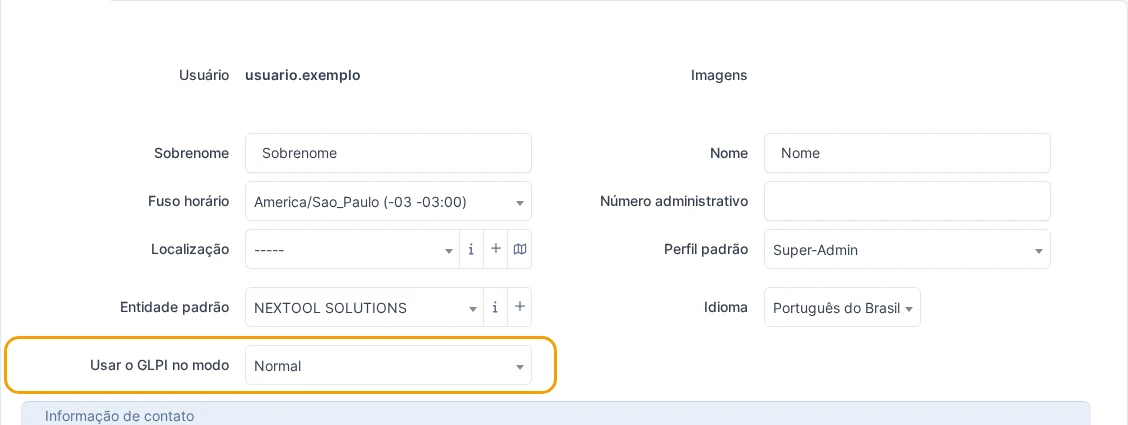
Two important notes. First: that field only appears for users with an administrator profile. If you cannot find it, the way forward is to ask an environment administrator. Second: debug mode makes GLPI display technical information across several screens and adds processing overhead. Switch back to Normal as soon as you are done, especially in production.
Clearing from the interface
With debug mode on, go to Setup > General and open the Performance tab. The three blocks now show a clear button each, every one of them clearing only its own cache.
If the buttons still do not appear after saving the preference, reload the configuration page. The performance tab loads its content asynchronously, and it may have been rendered before the mode change.
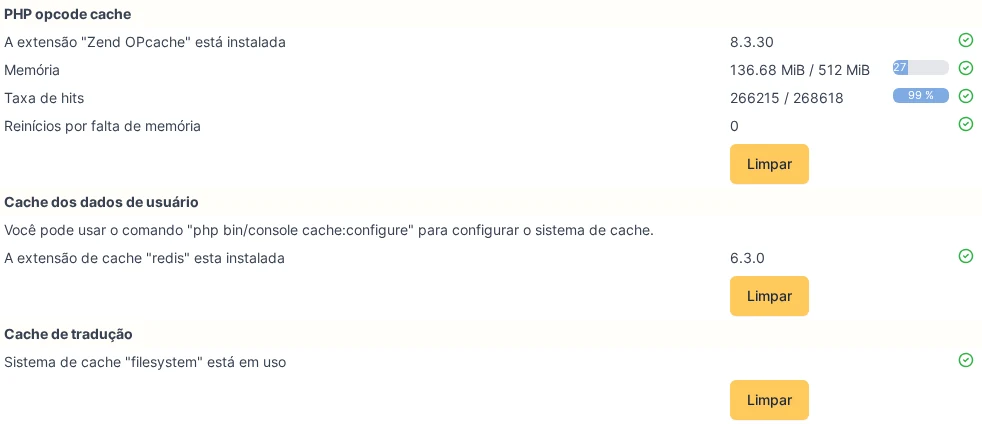
Clear only the block matching your symptom. Clearing all three "just in case" is an expensive habit: dropping the opcode cache forces PHP to recompile the whole application on the following requests, and in an environment with active users that shows up as slowness for a few minutes.
Clearing from the command line
Anyone with server access has a more direct path, which requires neither debug mode nor the interface. From the GLPI installation root:
# clears every cache context
php bin/console cache:clear
The command accepts a narrower scope, which is preferable in production for the same reason as above:
# clears only the translation cache, the most common case
php bin/console cache:clear --context=translations

# clears only the user data
php bin/console cache:clear --context=core

# clears a specific plugin's cache
php bin/console cache:clear --context=plugin:plugin_name
One precaution that saves headaches: run the command as the same user that runs the web server (usually www-data or apache). Running it as root recreates cache files owned by root, the web server can no longer write to them, and a temporary problem becomes a permanent one.
Note that cache:clear acts on the caches managed by GLPI. The PHP opcode cache belongs to the extension itself, and it is reset when the PHP-FPM service is reloaded.
Which one to clear for each symptom
| What is happening | Cache to clear |
|---|---|
| Text stays in the old language after updating a plugin | Translation |
| A new translation you added does not show up | Translation |
A change in a .php file has no effect | Opcode (PHP) |
| Setting saved but the screen shows the previous value | User data |
| Plugin menu or entry that does not disappear after uninstalling | User data |
What about GLPI 12?
Comparing the code of both versions, the method described here remains fully valid in GLPI 12: the same three caches, the same core and translations contexts, the same debug mode requirement for the buttons to appear, and the same console command. The disk directory follows the pattern of the 11 line, with the version in the name, as in files/_cache/12.0.0-rc1-08464f22-production/.
Two differences deserve attention from anyone running environments with many plugins.
The first is about memory. In GLPI 12, cache clearing now skips template precompilation, with an explicit justification in the code itself: there are more than 400 templates, and warming them all at once exceeded PHP's default memory limit. Instead, each template is compiled the first time its page is opened. In practice this makes clearing lighter and more reliable, but it shifts the cost to whoever opens each screen first after the clear.
The second is about plugins. In GLPI 12, enabling, disabling or installing any plugin now wipes the entire compiled template cache, not just that plugin's. The code itself records the limitation, with a note asking for the cache to be split per namespace in the future. The side effect is that, in an environment with many modules, touching a single plugin causes every template to be recompiled on demand afterwards. Nothing breaks, but the first screen loads are slower.
The case that fools you: half the screen translated
There is one situation where the translation cache fools even people who know the system well. The screen opens with some texts in the right language and some in the original one, mixed together, sometimes in neighbouring fields. The natural conclusion is that the plugin translation is incomplete.
Almost always it is not. When a plugin updates itself and overwrites its own files, it must invalidate two caches, not one: the opcode cache, so PHP starts running the new code, and the translation cache, so GLPI rereads the catalogs. Invalidating only the first produces exactly that result: strings that already existed keep being served from cache, translated, while the new strings from that version are not yet in the in memory catalog and show up in the source language.
What gives the case away is precisely the mixture. A genuinely incomplete translation tends to leave whole blocks in the original language, following the structure of the translation file. A stale cache leaves the old text translated and the new text not, with no apparent logic, because the split is not per screen: it is by what was already in memory.
Confirming it is simple: clear the translation cache and reload. If the screen becomes consistent, it was the cache. If the mixture remains, then it is worth investigating the language catalog of that version.
Production precautions
Three recommendations that apply to any environment with users at work:
- Prefer the specific cache over clearing everything. The symptom almost always points to a single one.
- Avoid peak hours when clearing the opcode cache, and in GLPI 12 also when clearing the general cache, since templates are then compiled on the first access to each screen. Recompilation happens on demand, so the cost falls precisely on whoever is using the system at that moment.
- Do not leave debug mode on. Beyond the overhead, it exposes technical details of the environment on screen.
When the problem is not the cache
If you cleared the right cache and the behaviour persists, two things are worth checking before digging further. First, whether the change actually reached the server: for plugins, confirm the installed version, not the published one. Second, whether your language has a catalog: if the plugin translates to es_ES and your profile uses a regional variant without its own catalog, GLPI falls back to the original text.
Reviewed by the NexTool Solutions team.